Floor Monitoring.
7-day free trial · Cancel anytime · Pay with card, PayPal, or USDT
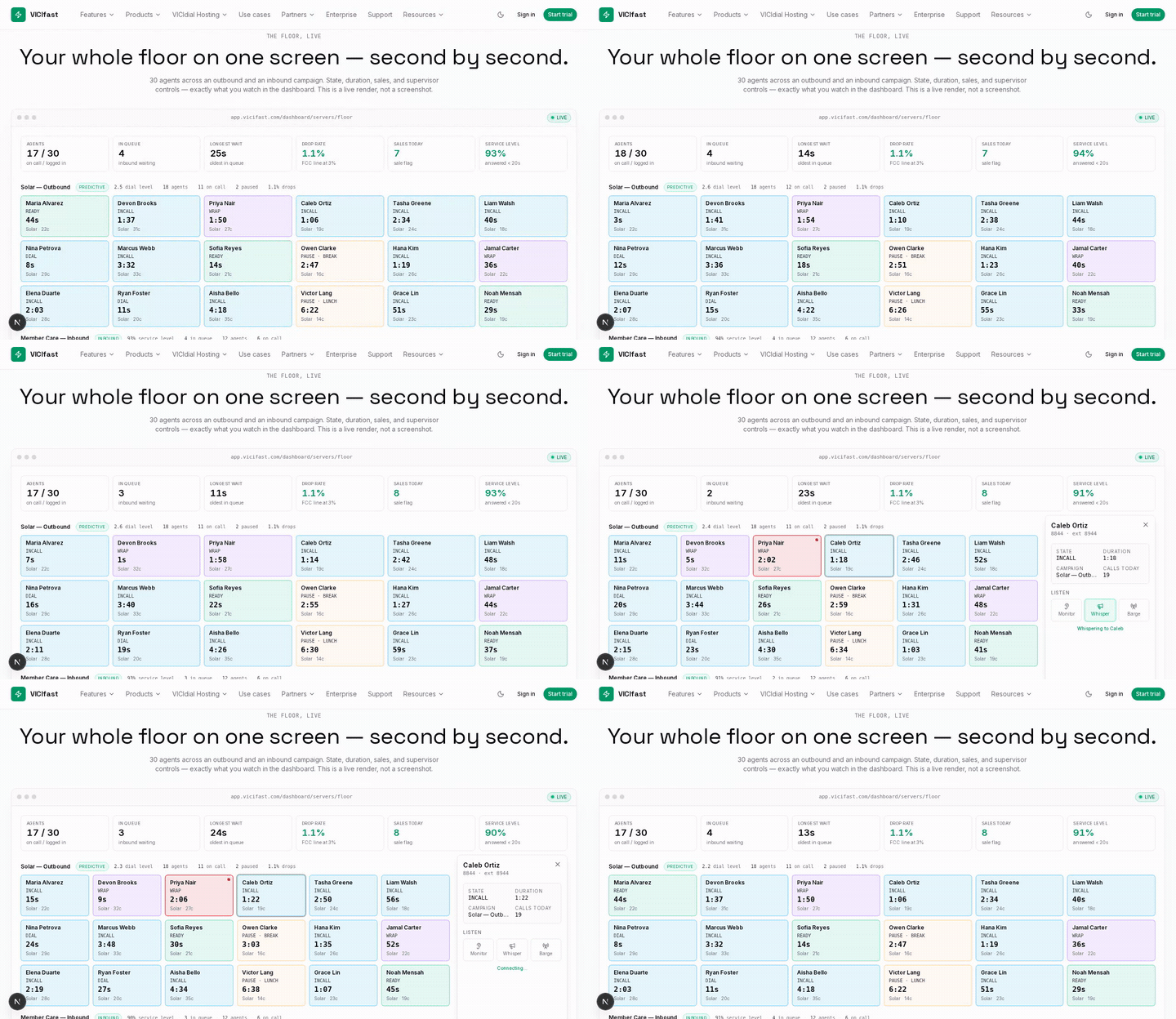
Sample data on a loop. The full live Floor runs on tablet and desktop.
The Floor, live — 30 agents · 2 campaigns · a live render, not a screenshot
Your whole floor on one screen — second by second.
Agents
17 / 30
on call / logged in
In queue
3
inbound waiting
Longest wait
25s
oldest in queue
Drop rate
1.1%
FCC line at 3%
Sales today
7
sale flag
Service level
92%
answered < 20s
Maria Alvarez
READY
42s
Solar · 22c
Devon Brooks
INCALL
1:35
Solar · 31c
Priya Nair
WRAP
1:48
Solar · 27c
Caleb Ortiz
INCALL
1:04
Solar · 19c
Tasha Greene
INCALL
2:32
Solar · 24c
Liam Walsh
INCALL
38s
Solar · 18c
Nina Petrova
DIAL
6s
Solar · 29c
Marcus Webb
INCALL
3:30
Solar · 33c
Sofia Reyes
READY
12s
Solar · 21c
Owen Clarke
PAUSE · Break
2:45
Solar · 16c
Hana Kim
INCALL
1:17
Solar · 26c
Jamal Carter
WRAP
34s
Solar · 22c
Elena Duarte
INCALL
2:01
Solar · 28c
Ryan Foster
DIAL
9s
Solar · 20c
Aisha Bello
INCALL
4:16
Solar · 35c
Victor Lang
PAUSE · Lunch
6:20
Solar · 14c
Grace Lin
INCALL
49s
Solar · 23c
Noah Mensah
READY
27s
Solar · 19c
Bianca Russo
INCALL
1:28
Member Care · 41c
Theo Adams
CLOSER
19s
Member Care · 30c
Maya Singh
INCALL
2:22
Member Care · 38c
Dylan Pierce
READY
8s
Member Care · 27c
Farah Haddad
INCALL
53s
Member Care · 44c
Logan Reid
PAUSE · Coaching
1:35
Member Care · 22c
Zoe Martin
INCALL
2:56
Member Care · 36c
Ivan Petrov
CLOSER
31s
Member Care · 29c
Lena Fischer
INCALL
1:07
Member Care · 40c
Cole Bennett
WRAP
22s
Member Care · 25c
Amara Okafor
INCALL
1:53
Member Care · 39c
Seth Rivera
READY
14s
Member Care · 28c
Sample data on a loop. Live floors refresh from your dialer in under two seconds.
Everything on the Floor
Every Floor feature, at a glance.
The Floor is the screen your supervisors live in all shift. Here is the whole surface — scanning, alerting, live coaching, and the numbers — in brief.
Live agent wallboard
Every agent on one screen, second by second. No refresh, no page reload, no spreadsheet.
State + duration on every cell
READY, INCALL, WRAP, PAUSE, DIAL — each with the clock that turns a status into a decision.
Threshold alerting
A cell escalates to red the moment an agent runs long. A red dot means “go look” — no scanning 200 rows.
Live KPI strip
Live, outbound, and inbound numbers up top — the same figures your reports reconcile to.
Drop-rate guardrail
Outbound drop rate turns red past the 3% FCC safe-harbor line, before it becomes a problem.
Inbound queue + service level
In-queue depth, longest wait, service level, abandons and answered — live for every in-group.
Per-campaign pacing
Dial level and agents logged / paused / on-call, broken out per campaign. Change pace without leaving the floor.
Silent monitor
Listen to any live call. Neither the agent nor the customer hears you join.
Whisper coaching
Coach the agent mid-call — only they hear you, the customer never does.
Barge in
Join the call three-way to save the deal, straight from the agent panel.
Force pause / log out
Pull an agent off the dialer or end a stuck session in one click — web or mobile agents alike.
Click-an-agent drill-down
Open any agent for today’s stats, disposition breakdown, and their last calls with recordings.
Wallboard mode
Throw it on a wall TV in fullscreen. It pauses polling itself when nobody is watching.
Realtime over WebSocket
Sub-two-second updates, with an automatic fall back to polling if the link drops.
Search + filter
Jump to an agent, campaign, or in-group instantly — built for the 200-seat floor, not a demo of five.
No agent-side install
Reads VICIdial’s own real-time tables. Your agents do nothing different; nothing to deploy to a desktop.
What you get
The full floor monitoring surface, end-to-end.
Every card below is a shipped capability. Hover for emphasis; click any matching feature for the deep page.
Real-time, no refresh
WebSocket stream from VICIdial's real-time tables. State changes hit the screen in under a second.
Per-agent state + duration
See who is on a call and how long they have been on it. Who is paused and how long the pause has lasted. Who is idle. The "duration" makes it actionable — a 20-minute pause is a different conversation than a 2-minute one.
Campaign + ingroup filters
Filter to a specific campaign or in-group when you have multiple teams running. Saves the supervisor scanning a 40-row table for the 6 agents that matter to them.
Mobile-friendly
The view is responsive — supervisors on the floor can pull it up on a tablet without losing data density.
Dense grid for 200-agent floors
8–10 columns of agent cards at 1080p, with state colour + duration. Built for the operations-density use case, not the consumer-app five-cards-per-page airy spread.
Drill into an agent in one click
Click an agent to open a side panel: recent calls, recent dispositions, paused-state history, audio quality stats. Same data the legacy admin surfaces under three nested tabs — here it is one click away.
Push notifications on threshold breach
Pager-style notification when an agent crosses a configured threshold (e.g. paused > 15 min). Supervisor sees the alert on their phone; no eyes-on-the-screen requirement.
Live shift summary
Floating header carries the now-state: total agents online, on-call, paused, idle, plus a calls-per-hour reading rolled across the floor. Lets the supervisor read shift performance without changing screens.
FAQ
Questions worth answering
See your floor without refreshing the page.
Start the trial. The floor view loads with your first agent login — per-agent state + duration, campaign filters, mobile-friendly, push notifications on threshold breach.